word entry
At the outset, I set myself the objective of the rewrite the entire ebook for the fourth PRISM There is no beating around the bush-ones-zero case - the objective was not achieved, although this is still a lot more than if I did not have before us a challenge.
the end of November I was able to read eight chapters with 11, but on the basis of the first six parts have been 4 on fourth PRISM Also, the things described in published my posts are implemented in my codeplex'owym DevPrototype project.
course, I'll finish what I started, but go over to this laid-back (coming holidays, duties, I have formed and become a snowman and stuff: P)
REQUEST: I hope you realize that the things that I describe is only a fragment full potential. If you are among those who rzyczyłby a complete, one of the posts with additional details, please write about it in the comments.
noticed that the blog and visit people outside of our country. With English with me at odds because additional training is always useful (I hope this does not shoot himself in the knee ;-)) So
If you want to read this post in Angielski, please leave message in comments below interesting post.
What now?
• The role of regions in the PRISM 4
- View Discovery
- View Injection
• Some code
role of regions in the PRISM 4
Simply put, the region is an area in which the indicator will be displayed in a particular module.
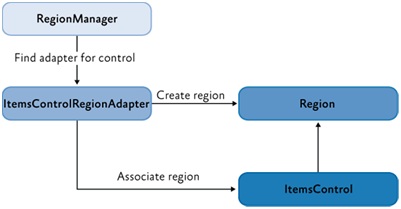
Imagine yourself that you have control ContentControl embedded in the view "ShellView.xaml" menadżeże registered in the region as "Region". At the time of the sample initialization module "module", is recorded in the DI container view "View" and in the regions menadżeże view is associated with a region called the "Region". When the display view "ShellView.xaml", the program knows that it needs to download the "module", which during its initialization sets the "View" as the active view in the "region" so that we can see it in naszyej kontrolce ContentControl.
Why this treatment? Well, thanks to the region we see any views from the loosely coupled modules. Of course, it should be noted that the relationship between the region and overlooking a 1: N or a region can have multiple interrelated views of the region while displaying only the active view.
Prism allows us to register the number of regions and creation of nested regions. Regions may play a role: ContentControl, ItemsControl, TabControl, and in the scenario with navigation Frame.ContentLoader (last scenario can not be found in the described ebook'u, however, at this address http://blogs.msdn.com/b/kashiffl can find a very interesting article about combining the functionality of the regions with Silverlight Navigation Framework)
View Discovery
This strategy of rigid type of connection to the region, ie regional manager let you know that for the region "Region" is to be created view "View" so that upon entry into the region, the form will automatically create an instance of the view "View". In this scenario, we are limited to only this one pair of region-view and we have no control over the lifecycle of the view in the region.
View Injection
As you probably guessed, this solution is in many places, the opposite of the above, ie, the region may be associated multiple views that can be recorded during the operation. Here we have full control over the lifecycle of views in the region so we can add, delete or alter their activity. The fullness of freedom in the region's management also allows us to display different views of him / data. Mode of action of this strategy was described at the outset this post. It is obvious that this solution much better suited to business applications.
bit code
registration region in view
 \u0026lt;UserControl x: Class = "UIComposition.Shell.Views.ShellView"
 xmlns: prism = "http://www.codeplex.com/prism"
 ...>
 \u0026lt;! - Left Area ->
 \u0026lt;Border Grid.Row="1">
 \u0026lt;ContentControl x: Name = "LeftRegion" prism: RegionManager.RegionName = "LeftRegion" />
 \u0026lt;/ Border>

 \u0026lt;! - Main Area ->
 \u0026lt;Border Grid.Column="2" Grid.Row="1" Grid.RowSpan="2">
 \u0026lt;ContentControl x:Name="MainRegion" prism:RegionManager.RegionName="MainRegion" />
 \u0026lt;/ Border>
 \u0026lt;/ UserControl>
Sample module together with a piece of initialization code
 public class ModuleInit: IModule
 {
 ...
 public void Initialize () {

 / / View Discovery
 this.regionManager.RegisterViewWithRegion (LeftRegion ", () => this.container.Resolve \u0026lt;EmployeeListView> ());

 / / View Injection
 IRegion this.regionManager.Regions mainRegion = ["MainRegion"];
 if (mainRegion == null) return;

 EmployeeSummaryView mainRegion.GetView view = ("EmployeeSummaryView") as EmployeeSummaryView;
 if (view == null) {

 / / Create an instance of the new view
 this.container.Resolve \u0026lt;EmployeeSummaryView> view = ();

 / / And add it to your view. At this point the view will automatically set itself as an active
 mainRegion.Add (view, "EmployeeSummaryView");

}}}
Management class in the sample region, "MainRegion"
 public class AnotherClass
 {
 IRegion this.regionManager.Regions mainRegion = ["MainRegion"];
 if (mainRegion == null) return;

 EmployeeSummaryView mainRegion.GetView view = (" EmployeeSummaryView ") as EmployeeSummaryView;
 if (view! = null) {

 / / Activate the view, which was previously added to the region
 mainRegion.Activate (view);

}}
Quite helpful feature of the regions, it may be the
prism.RegionManager.RegionContext
context that allows you to share data between views.


